Showing posts with label Guides. Show all posts

Thursday, March 06, 2008

Germany

Germany is a country roughly the size of the Malaysia that is situated right at the middle of Europe. If you guys that had been through the secondary school education in Malaysia and still didn't know where the heck is it, go back and relearn your history and geography as well.

Here in this article I will discuss about the clichés that are often said about this country and whether they are true or not, based on my personal experiences.

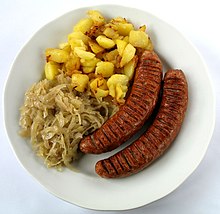
1. Are the German Sausages nice?German sausages or commonly known here as Würst here consists commonly of pork, beef and turkish meats. And there are lots of variants of them as well. Some of them looked like those in the picture, very thick and short for the standards here. If you really need numbers, the diameter of these kind of sausages can go up to 3cm or so. And then there will be some that are really thin but ultra long, often reaching more than 30cm.

Unlike the dish seen here, most of the time the sausaged will be taken with breads (Brötchen), either in between 2 halves or eaten separately.

2. Breads
During my orientation class when I first came to germany, the teacher said that Germany itself can offer more types of breads than any other place in the world. When you go into any breadshop over here, you might go dizzy with the array of breads on display ready to be sold and eaten by it's hungry customers. Locally at my state, they offer pretzel as a local specialty (I don't find them particularly nice, a tad too salty due to how they are produced).

Most of the bread shops here offer some kind of oven to heat up your selected bread should you have any kind of interest in warmed food.

3. Do the Germans like to drink beers?
The answer here is obviously a big yes. They germans here LOVE it in fact, even more so in the southern region of Germany. One of the most famous festivals related to Germany, the Oktoberfest celebrated all over the world, originated from the city of Munich (München).

Apart from the festive times, they also drink beers during party times as well as during gatherings. At these times it can be irritating because when they are drunk, they can do all sorts of wild things. Most of the times they are just irritating, like making loud noises or throwing bottles out of the windows. Sometimes they can get quite scary as well, like randomly opening other peoples' doors, fights and vandalisms. I have had at one time a guy opening my door after a party at my uni at 3am. Lucky he just closed the door afterwards. At one time the police actually e-mailed to all students asking for information on a serious injury occured to a poor guy after a party gone wrong.

But all in all, if you don't overdo it, drinking beers with the Germans can be pretty relaxing, sitting around in the common room chit-chatting (I miss those times).

As for me, yes, I do drink here, but only once in a few weeks and no more than one bottle at a time. So, most of the time I can still keep to my senses, no worries here ;)

The Germans use an array of different glasses to drink their beers from. The ones that you usually see in the pictures are the mugs, really big ones. Most of the time though, when you order beers at a german restaurant, they will serve you beer with a glass that is about 30cm in heigt that is a bit thinner at the bottom than the top.

Well, I think that is all that I can write at time time. Will be posting more on such things in the future.

It's already 6am here, and I still haven't taken my good night sleep... Scold me la for not sleeping earlier (screw the bowl of tom-yam bee hoon I cooked for supper just 3 hours ago).

Anyway, to the all of you out there, take care always and don't inhabit the bad habit of being a late night cat from me...

seehua
*Music can help on soothing anxious minds. If you find yourself very nervous or anxious, get some music at the right pace to set yourself to the correct mood ;) ~

all pictures are taken from their respective Wikipedia pages.
Current interest: Options trading
Current activities: renewing visas, reading, tweaking my new handset, sleeping and generally lazing around

Wednesday, November 01, 2006

Freewares that I use...

Here is a list of free (as in free beer) softwares that I had downloaded from the web for my own personal use, along with a very short description of it's usage.

1. Web Browser - Firefox: THE browser for those who wants simplicity, but can be extended to fir their own needs. While simple and elegant in design, it's support for extensions and the huge community to code myriads of extensions had won it many converts from the once insecure Internet Explorer. However, as it's market share continues to grow, more and more exploits had been associated with this software. As said, nothing can be truly safe online...

2. Image Editing - GIMP: GIMP stands for GNU Image Manipulation Program. It is a powerful image editor that rivals even the venerable Abobe Photoshop series, but without the associated costs. Many seemed to not able to get used to it's interface though, as it's a lot different from Photoshop.

3. Image Management/Viewer - Google Picasa: Voted by many tech editors are the best image management software, it's very simple yet very powerful. I use it mainly for it's intergration with Blogger and Picasa Web, as well as to browse my collection of photos easily.

4. CD/DVD Burning - CD Burner XP Pro: A decent alternative to Nero Burning ROM/Express. It's clean interface is easy enough for me to use it for everyday burning. I do test lots of Linux distributions, so disc burning had became a norm for me. and CD Burner XP Pro provides just that for free.

5. File (De)Compressions Program - 7zip: It's simple to use and supports huge amounts of compression formats, including .zip, .rar, .ace, and lots more. It's own compression mechanism, 7z provides the best compression ratio and is being adopted within the Linux community for their uses.

6. FTP Client - Filezilla: Small program and good performance for usage with ftp servers.

7. Music Management - iTunes 7.0.2: I use this music management program simple because of it's automatic sorting of my music files accordingly. While there are complaints against it's latest version for being buggy, the latest version, 7.0.2, which had just been released yesterday, seemed to had fixed more of the more serious problems. One very annoying bug that had been fixed is the cracking sound produced, finally I can play my music smoothly.

You guys might have noticed an earlier post regarding Songbird. Well, I am using it as my secondary media player, interchanging it with iTunes. It seemed to be a very promising project, and I will track it's progress all right. But for now, it's just a bit too buggy for normal consumption. If you feel adventurous, do give it a try, it's cool all right.

8. Movies (Codecs, Movie player etc.) - K-Lite Mega Codec Pack: This nifty little package contains all that you will ever need to play all kinds of media formats. And it also comes with my favourite movie player, Media Player Classic. Of course, you can opt not to install this player if you don't like a bland interface, it's codecs can work with any movie player that supports Microsoft Directshow interface.

That's all for introduction to the freewares that I am using with my own computer. It's specific to my Microsoft Windows installtion though. Under Ubuntu Linux I am using another set of softwares for the same needs. That I will dedicate another post for it.

Till next time, c'ya

seehua
*Let's create a world full of LOVE~

Saturday, October 14, 2006

Howto: Use RSS Feeds with Firefox 1.x/1.5.x

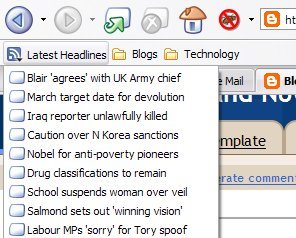
RSS (Really Simple Syndicate) is a way for websites to provides updates without needing the surfer to manually navigate to it. This is accomplished by the use of 'feeds' which are regularly updated and updated by RSS-readers. An example of RSS in action is the 'Latest Headlines' within Mozilla Firefox


This RSS Feed is always install by default with Mozilla Firefox and provides the latest updates from the British news agency BBC. I use it to check on the latest news from around the world once every few hours and middle click on the topic that interests me to read the article. Pretty handy because I don't have to go open up a new tab just to see what's new *wink wink*.

Here's how i manage my own RSS feeds.

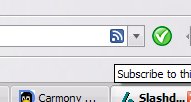
First of all, we need to determine if the site provides RSS feeds, this is indicated by an orange coloured symbol like the one shown below at the end of the address bar of Firefox. Mine looks blue because of the Firefox theme I am using changed the colour of the default icon(second picture below), but it functions the same nevertheless.


Click on it, and it will pop up a window like the one below:

From here you can choose to add to any bookmark folder that you are using. In my case, I made a folder especially for blogs which I read regularly.

Oops, I think I just revealed what I read regularly... hehe...Nevermind, it's not things that I have to hide.

Neat feature eh? Now you guys can also catch up on things faster as well. Sadly, Internet Explorer 6 that comes with Windows XP don't support RSS. The browsers that do are anything other than IE6 and released within the last 3 years like Firefox and Opera.

That's all for my Howto this time around, take care yah everyone out there=)

*It is confirmed that Internet Explorer 7 will be released as an update by Microsoft within this month, do upgrade by then because of it's enhanced security and usability features compared to IE6.

Short note: I had tested with using Opera for one week for the last week, but i still find that i like Firefox better... maybe I am just too used to the handling a web browser the Firefox way... And I find that Opera actually operates slower with my computer... Maybe i had optimized my firefox way too much for Opera to catch up=p hehe

Anyway, went fishing in class everyday.. sometimes kena ikan bilis, sometimes ikan jerung, and sometimes ikan paus... hehe... Anyway, the best part of this semester is, I HAVE 3 DAYS WEEKENDS, YAY!!!

20 things an average person don't know about Windows XP (Link)

Found out about this site from Digg. Kind of useful for you guys... Read it up, and speed up the way you use windows xp... I might write some tips on my own later, because some of the tips presented there are kind of too complex to follow, and there are alternative ways which are easier to follow. =)

enjoy

20 Thinge the Average Person Doesn't Know About Windows XP

Sunday, September 10, 2006

Howto: browse the internet safely

Helo to all. This post is kind of a kick off for my new series in this blog. If it do gets better, i might just make a new blog based on it. For now, i am just going to give you all advices on a field where i had done so much research but still have a lot more to learn, computing.

To kick it all of, the first topic is about security.

We all know that the internet is a dangerous place to go without a good set of protection tools, especially if you are using Microsoft© Windows® series of operating systems. With so much news on more and more exploits discovered and exploited out in the wild now, there is no better time to be concerned about these issues. Your own precious data might be released in the wild, and used against you in various ways. The most notable way is your stolen credit card number being used to buy hell of a lot of things through e-bay orany other online shopping sites. Then the next time you check on your credit card usages, to your horror, you find that you have a debt amounting to millions.

ok, that's just one senario that might happen. Yes, I know most of the people who will frequent this blog don't do as much online shopping as I do, but there WILL be usages for your personal infos and passwords. So it's always better to be on the safe side rather than to be sorry.

Here are some simple steps that you can do to prevent yourself from becoming a victim of online fraud.

1. Whenever an e-mail comes to your inbox and asks for your private information or details on e-bay/bank/paypal accounts, ignore it. They are most probably phishing e-mails sent out by people with bad intentions who wants to get their hands on your private data. If you are in doubt, call or e-mail the representatives of the institutions involved.

2. If you are using Windows operating system(any version), make sure you protect yourself with at least an antivirus and antispyware programs. If you can't afford to buy the licences from the big guns (Symantec, Mc Afee), there are a lot more antivirus vendors out there like AVG, Avast, Anvira and some others that will offer you decent protection without slowing your computer to a crawl. As for antispyware protection, you can get decent scanners from Lavasoft Ad-Aware, Spybot search and Destroy, and Windows Defender. Remember to update the programs often, and scan your system once in a while.

3. Remember, the worst link in the chain is the human that is operating the system, i.e. yourself. It's at the outmost importance that you adopt safe-internet practices.

-Don't just forward everything that comes into your mailbox, especially those which are likely
to contain frauds and false news. It will only serve to spread panic. If you want to verify the
authencity of these mails, you may surf to www.hoax-slayer.com to get a accurate info on that particular topic.

-Don't store sensitive passwords (bank login details etc) within your browser. Always log in manually from the front page of these pages by typing in the username and the passwords yourself, and not storing it in the internet browser's cache. Laziness will cost you a bomb in this case, so don't be lazy here.

-Don't do your critical transactions using a public computer(school computer labs, libraries, cyber cafes etc.). You'll never know that the computers have keyloggers installed or not. So like always, it's better to be safe than sorry.

So here we are, some simple to take steps to ensure that you can surf the net safely. There are a lot more steps to take of course. But for now, these will suffice to make your internet-surfing experience relatively safe and enjoyable. So, until the next time I post another entry in this long unupdated blog, take care always there yah...

*tata~

metta

seehua
-Let's create a world full of LOVE =)